Goodbye to the Pain of EBS Report Development: How I Cut a Tedious Workflow Down to 5 Minutes with SQLVantage
An Oracle EBS veteran with 18+ years of experience shares how he escaped the agony of EBS report development: the ceremonial registration of executables, concurrent programs, value sets and request groups, plus the recurring nightmare of text-file output that forces users to manually split columns in Excel. He built SQLVantage, a minimal reporting toolkit where developers only write SQL and configure parameters, and the platform delivers native Excel (.xlsx) or JSON output in about 5 minutes. A real-world comparison shows the traditional path taking roughly 80 minutes versus 3 minutes with SQLVantage, and the author reports over 80% reduction in average delivery time with sharply improved user satisfaction.
Goodbye to the Pain of EBS Report Development: How I Cut a Tedious Workflow Down to 5 Minutes with SQLVantage
As a veteran who has spent more than 18 years in the Oracle EBS trenches, I know all too well the fear of being ruled by text-based reports.
Whenever the business team urgently needs a piece of data, we have to go through the "standard routine": gathering requirements, writing SQL, registering a concurrent program, and assigning responsibilities. And after all that work, the users still have to Save As Text → Paste into Excel → Split Columns — and if any field (like an item description) exceeds the preset width and wraps automatically, the whole Excel column split falls apart.
The daily "develop for 5 minutes, fight fires for 2 hours" routine — I'm sure every EBS practitioner remembers it well.
It was exactly this recurring pain that made me decide to stop putting up with it. In my spare time, I built a custom report development toolkit designed specifically for Oracle EBS from scratch — SQLVantage. It's not some disruptive technology, but it genuinely rescued me and my team from the tedious workflow.
1. Years of Pain: We're All Tired of the "Text → Excel" Torture
Before diving into SQLVantage, I want to take a moment to give a panoramic recap of the pain points we've hit in EBS report development over the years. I'm sure that if you've worked in EBS development, the following scenarios will make your blood pressure rise.
Pain Point 1: The "Eighty-One Ordeals" of the Development Workflow
A typical EBS report development process goes like this:
- Write code: Fine-tune your SQL in PL/SQL or Report Builder.
- Register the Executable: Log in to EBS, find "Define Executable", and fill in a pile of fields.
- Define the Concurrent Program: Create a Concurrent Program and attach the executable you just created.
- Define parameters and value sets: Bind a value set to each query condition and handle rules like "required?" and "default values".
- Attach to a request group: To test, you still have to attach the report to your own responsibility, or ask an administrator to do it.
- Submit the request and review the log: It failed at runtime? Read the log file. Parameters wrong? Resubmit.
By the time this combo finishes, at least 20 minutes have gone by. For a simple query request, this takes even longer than writing the SQL itself. I call this pattern "the ritual of inefficiency" — we're forced to burn our time on system bureaucracy instead of actually solving the user's data need.
Pain Point 2: Output Stuck in the "Stone Age"
This is the stage that drives me crazy.
Users don't care whether your report was built with RDF or XML Publisher. They only care about one thing: in the end, can I get a well structured Excel? So what does EBS natively produce?
- Text files: Whether
.txtor.out, it's fundamentally fixed-width or comma-separated text. - Fake Excel: Even Excel generated by BI Publisher often has merged cells, breaking formatting, and other issues.
So the user's daily routine becomes "data porter":
- Open the report output file (text format).
Ctrl+Ato select everything;Ctrl+Cto copy.- Open Excel and paste with
Ctrl+Vinto the first column. - Click "Data" → "Text to Columns", choose "Fixed width" or "Delimited".
- Here comes the nightmare: If a field in the report (e.g. the "long item description") is too long and exceeds the preset report width, it will wrap to a new line. In a text file, a wrap means "a new row". When the text comes into Excel and gets split into columns, that single complete record gets incorrectly torn across two or more rows — and every piece of data after that is misaligned!
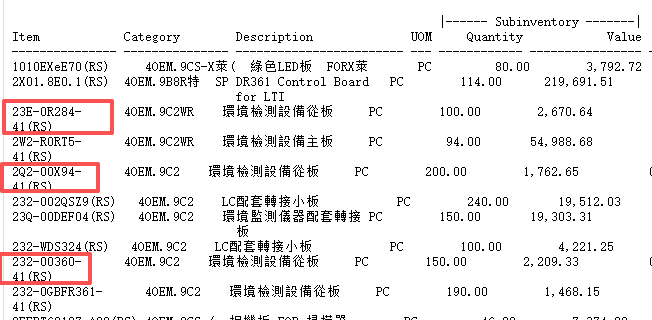
(Text wrap causing Excel column split chaos — the eternal pain in every EBS user's heart)
To fix this one error, users may have to manually adjust hundreds of rows, or re-tune the report width and rerun everything. When the business is in a rush, this alone is enough to break a person on the spot.
Pain Point 3: Response Speed Can't Keep Up with the "Modern Economy"
The business environment today demands minutely response. A business manager says "I want to see the real-time inbound stock of the top 10 SKUs in East China today." Under the traditional EBS framework, this feels like a complete development, testing, and deployment pipeline. Meanwhile, the report is attached, it's probably already the next day, and the best decision window has passed.
We're answering today's "agile" business needs with a 20-year-old "waterfall" development workflow. That mismatch is the root of our pain.
2. Breakthrough: The "Minimalist" Philosophy of SQLVantage
Since the standard process is so slow, why not build our own wheel?
The design philosophy of SQLVantage is pure simplicity: Strip away every unnecessary process burden from EBS custom report development, and leave only the core two things — write your SQL, configure your parameters.
Rather, it is a lightweight platform for fast report generation and delivery aimed at end users.
Core Advantage 1: Lightning-Fast Development
In SQLVantage, developing a report is compressed to its simplest:
- Write your SQL: Tune up that final SQL script in PL/SQL Developer or Toad.
- Simple configuration: In the config screen, just define the "report name", "SQL statements" and "parameter names" (like start date and end date).
- One click to boost: Save. That's all.
And the kicker: you don't need to define an Executable, don't need to register a Concurrent Program, don't need to set up value sets, don't need to mount a request group.
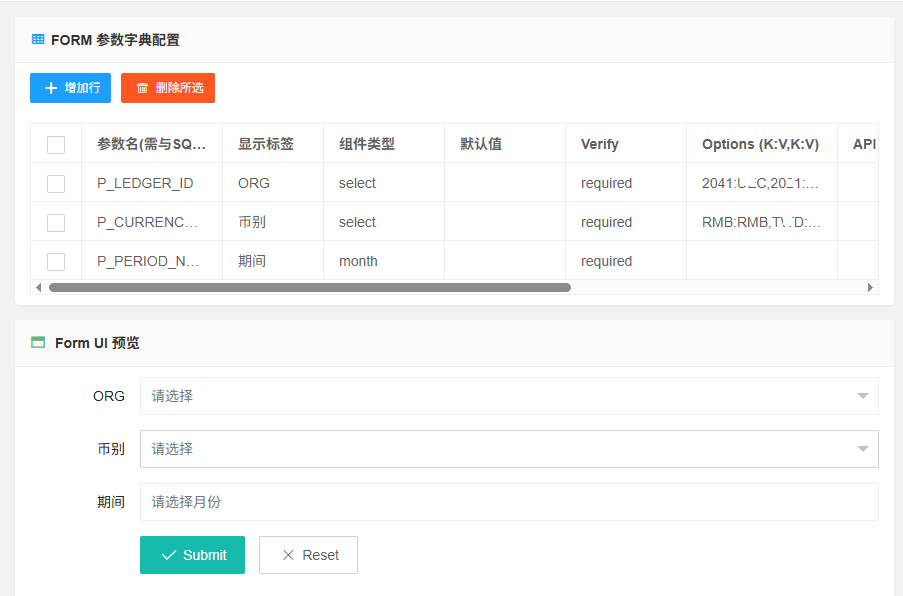
(The SQLVantage config screen: you only care about SQL and parameters, everything else is automated.)
It used to take over half an hour of registration and deployment; now a report can be ready within 5 minutes. Spend your precious time on SQL logic and business, not clicks in the back office.
Core Advantage 2: Native Excel/JSON Support
This is the killer feature that cracks SQLVantage's biggest pain point.
When end users run a report, what they no longer see is that headache-inducing text file. Instead, they get a directly usable, clean, beautiful Excel file (.xlsx) or structured JSON data.
- No column splitting: The system lets a base API write the query result set into Excel cells directly, with each column and data row mapped one-to-one.
- No cleanup: Even if a cell holds a very long text with line breaks, Excel's cell properties handle wrapping and column widths natively — the rows are 100% preserved.
- Friendly formatting: Numbers, dates, and currency formats auto-match, so the moment a user receives the file, they can pivot, sort, and use formulas.
From now on, you say goodbye to manual column splitting and to the corruption caused by line wraps.
Core Advantage 3: Maximum Convenience & Agility
- Instant results: For a sudden new requirement, I can configure a temporary report in the SQLVantage console, send the user a link — they open the page, see the results, and download the Excel in one click.
- Connection pool management: The SQLVantage backend maintains an efficient pool of connections to the EBS database, so high concurrency won't cause unstable output.
- Flexible formats: Excel isn't the only format. When the report needs to feed an external system (like a data lake or a BI dashboard), it can output JSON directly — dramatically improving integration efficiency.
3. Comparison by Scenario: A True Story
Last Tuesday at 3 PM, the CFO rushed up to me needing an "AR aging summary by product line across organizations" — needed for a 5 PM meeting.
In the old way (traditional EBS): I immediately opened Toad to write SQL — multi-org access control (MOAC), currency conversion, aging bucket logic — and by the time I finished and debugged it, it was already 3:50. Then I started the march:
- Log in as EBS System Admin, define the Executable.
- Define the Concurrent Program and configure that long list of parameters (org, currency, as-of date) one by one.
- Set up value sets and validation.
- Attach it under the Finance responsibility. All done, clock checked: 4:40. Submit the request, it runs for 2 minutes, download the text output... and sure enough, because the company name was too long, the column split failed. Adjust the report width (if you have permission), rerun — it's 5:10. Meeting's sunk, I got blamed.
Now (with SQLVantage): At 3:00 PM, I take the same SQL (with all the complex logic) into the SQLVantage configure screen. Define parameters: P_ORG (Organization), P_CURRENCY, and P_AS_OF_DATE. Click "Enable". Total time: 3 minutes. I send the CFO the link: "Open it, enter your parameters, and you'll get an Excel you can present directly." The CFO had the data by 3:10, formatted it as "Accounting", and finished the reconciliation at 3:15.
See that? That's the efficiency gap a modern tool brings.
4. Conclusion: Old Soldiers Never Die, They Just Get a New Weapon
18 years in EBS has taught me how powerful — and how heavy — the system is, and how much historical baggage it carries in UX and development speed.
SQLVantage doesn't sit on the same level as EBS — it's the opposite: a modern release of EBS's underlying data power. It encapsulates all the annoying "process" and "format" problems, letting developers focus on "data" itself and users focus on "analysis" itself.
If you're also fed up:
- Every report release still requiring the whole tedious registration ritual;
- Users manually splitting columns for every export, and getting crushed every time a line wraps;
- When business arrives, you say "this report will take 3 days";
— Maybe you can, like me, try a different path. We deserve to be our own best product managers.
SQLVantage has been rolled out inside my team, cutting average report delivery time by over 80%, and user satisfaction is way up.
Technology keeps changing, but the need for fresher data has always existed. I hope this story, and the trick called SQLVantage, can bring hope to colleagues still struggling in the EBS report wilderness.
If you're curious about the internals of SQLVantage (like dynamic parameter parsing or streaming output for large result groups), feel free to leave a comment. In an unpredictable world, let's use technology and buy our teams a little time.